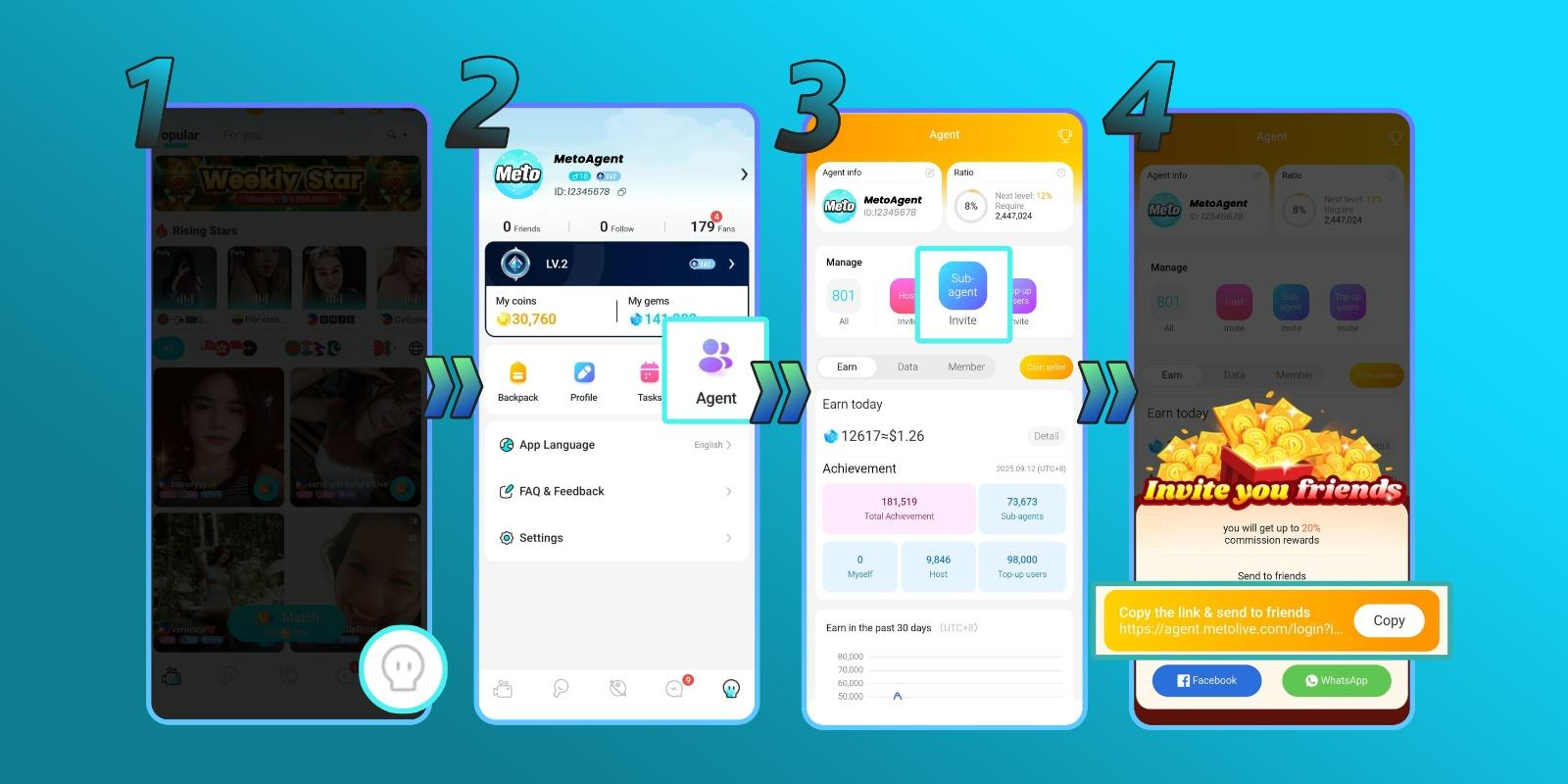
Meto Live Agents help grow the Meto Live community by inviting Hosts and Sub-Agents. As an Agent, you can manage your team, track performance, monitor gain details, and earn commission based on your agency activity.
A Meto Live Agent is a partner who helps invite and manage Hosts and Sub-Agents inside the Meto Live platform. Agents can grow their own network, monitor team activity, and earn commission from agency performance.
Through the Agent Dashboard, Agents can view invitation links, gain details, ratios, and the number of Hosts, Sub-Agents, members, or users they have invited.
Follow these steps to register as a Meto Live Agent and access your Agent Dashboard.
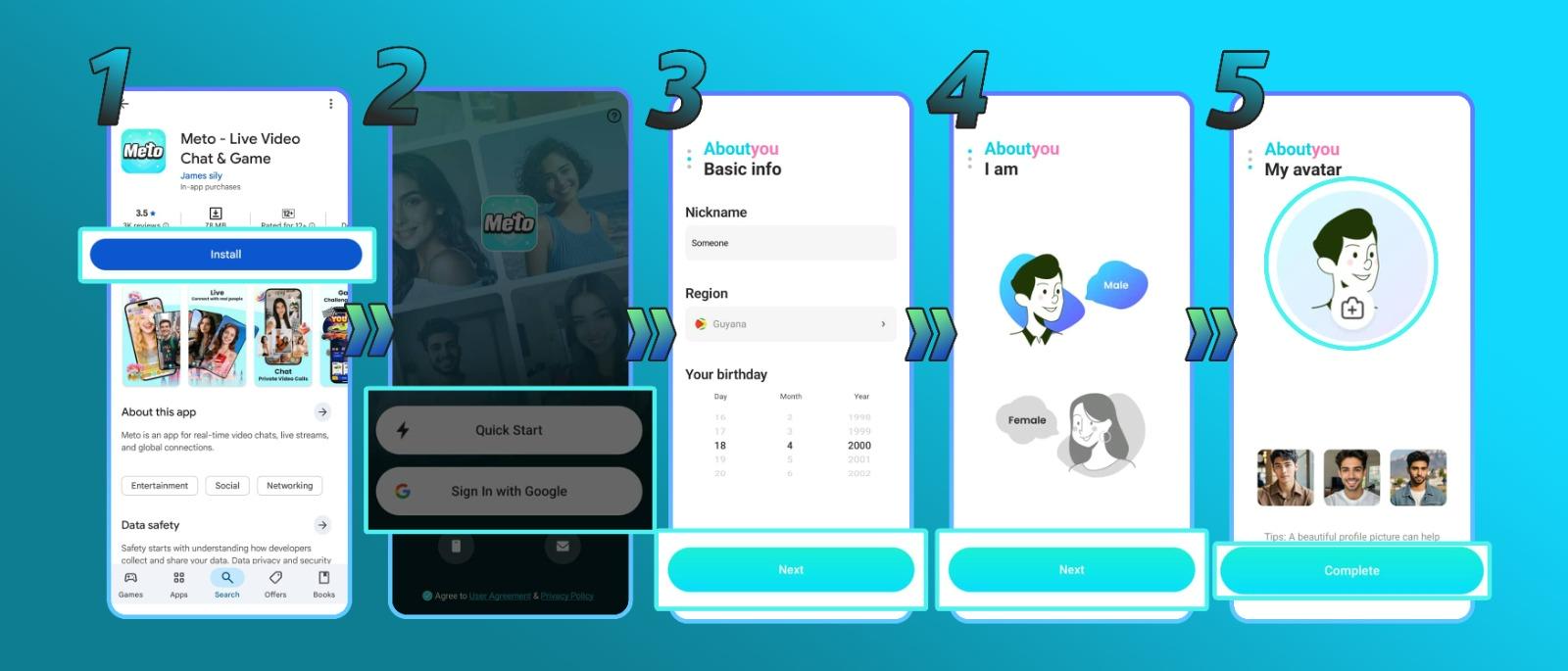
Download the Meto Live app using the official download link.
Download NowCreate your Meto Live account. You can sign up using email, phone number, or Google account.
After creating your account, visit your Meto Live profile and copy your account ID. You will need this Meto ID to continue the agency registration process.
Go to the official Agency Registration page using the link below.
Open RegistrationPaste your Meto ID into the registration form, then click Get. You will receive a verification code message through your Meto Live app.
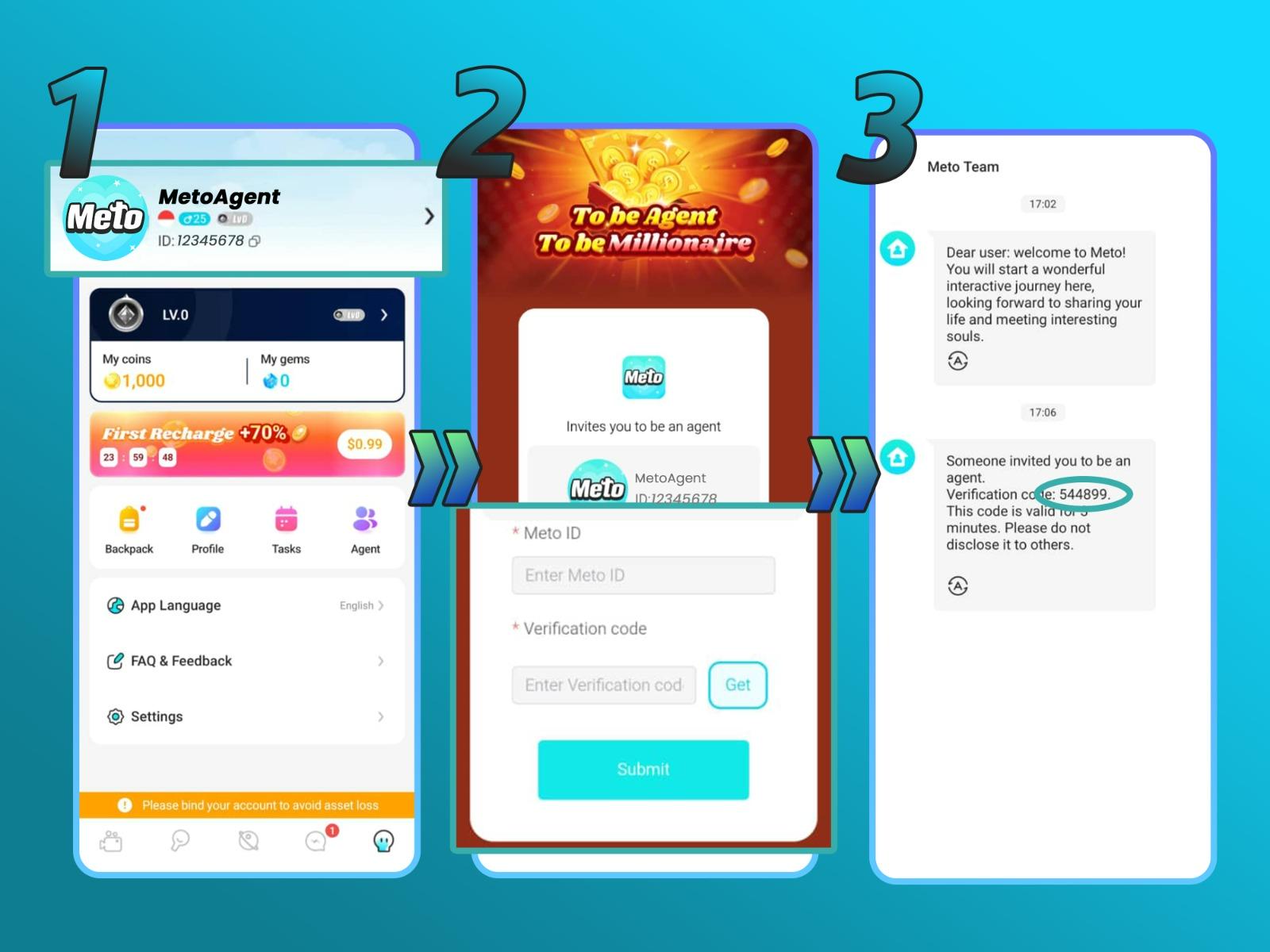
Enter the verification code, then click Submit. After submitting the code, you will be redirected to the Meto Live Agent Dashboard.
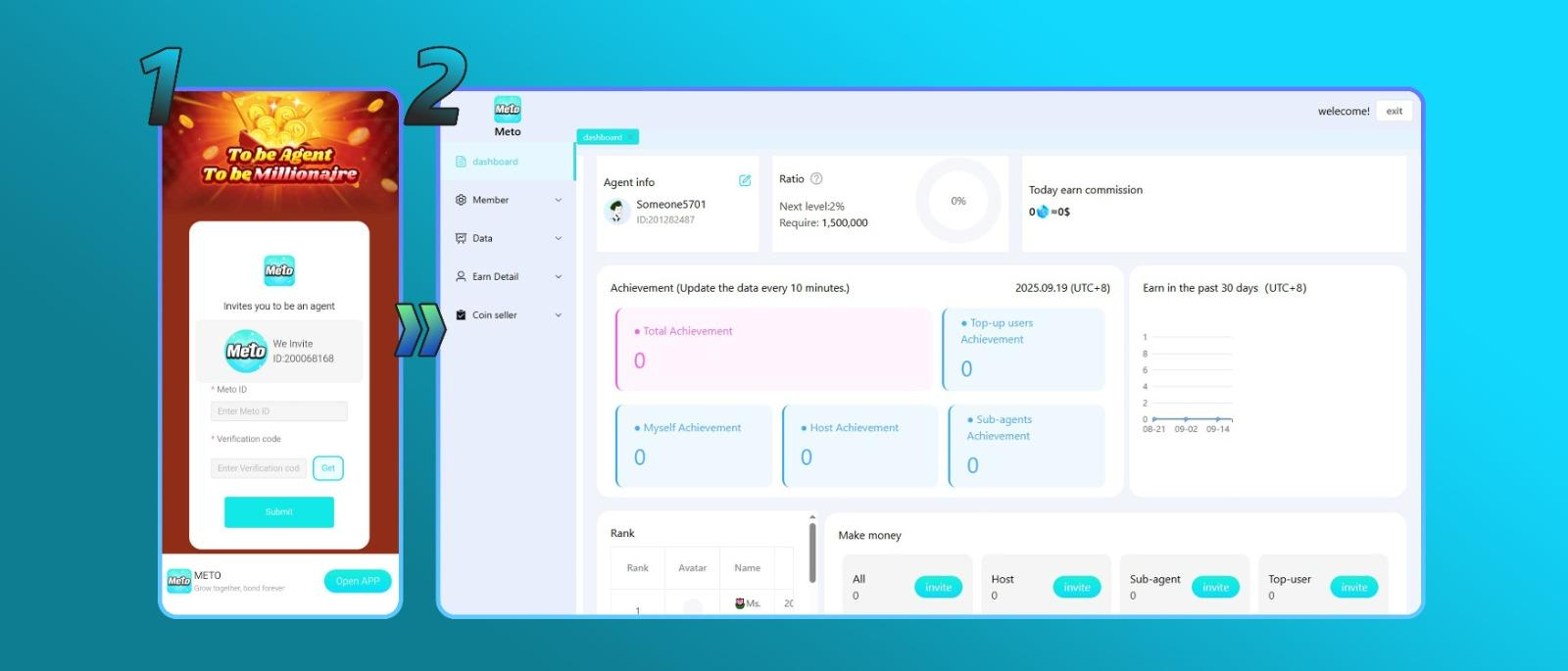
After successful registration, you can access the Meto Live Agent Dashboard. This dashboard helps Agents monitor and manage agency activity in one place.
Agents can invite new Hosts directly from the Meto Live app.
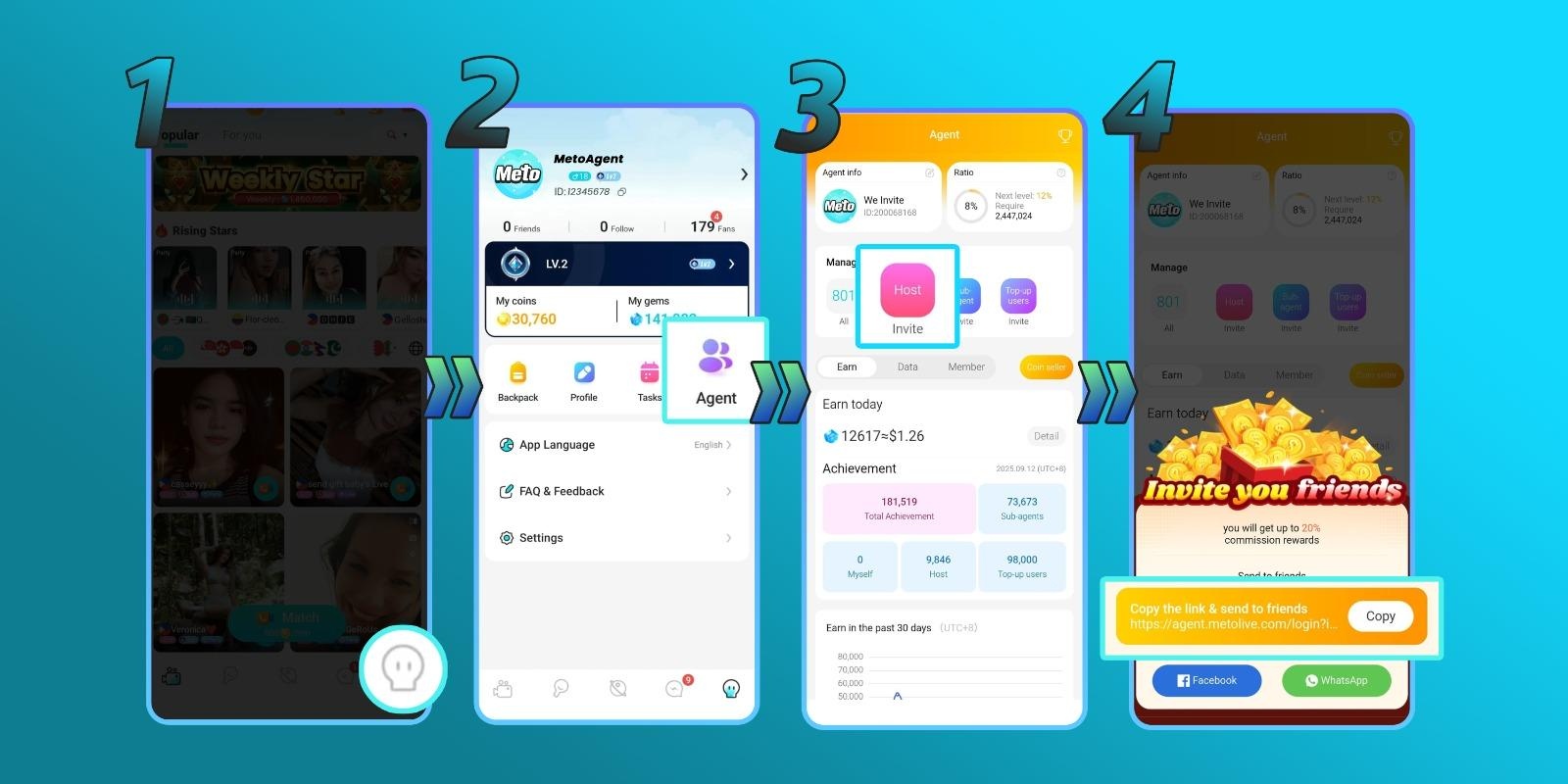
Agents can also invite Sub-Agents to help expand their agency network.
Meto Live Agents can earn commission from agency revenue. Agency revenue may include recharges and earnings from Hosts, Sub-Agents, and invited users. The commission rate is calculated based on the last 30 days.
| Total Earnings & Recharges | Commission Ratio |
|---|---|
| $0 - $150 | 4% |
| $150 - $500 | 8% |
| $500 - $1,500 | 12% |
| $1,500 - $5,000 | 16% |
| $5,000 - $15,000 | 20% |
| $15,000 and more | 24% |
Commission rates, calculations, rewards, and payout rules may vary depending on country, account status, platform policy, and the latest Meto Live program rules.
Agents can earn coin rewards by inviting users to join Meto Live. Agents may earn additional coin rewards when invited users complete certain tasks. Rewards are cumulative.
| Task | Reward |
|---|---|
| Registration | 600 coins |
| Phone number or face verification | 1,400 coins |
| Withdrawal | 5,000 coins |
| Recharge 5,000 coins | 5,000 coins |
| Invite friends | 2,000 coins / user |
Conversion Rate: 5,000 coins = $1.00
Rewards may change according to platform policy. Please confirm the latest reward details inside the Meto Live app or Agent Dashboard.
Agents and Hosts can withdraw earnings through the Meto Live app after meeting the minimum balance requirement.
Payout methods, minimum withdrawal, processing time, and availability may vary depending on country, account status, and platform policy.
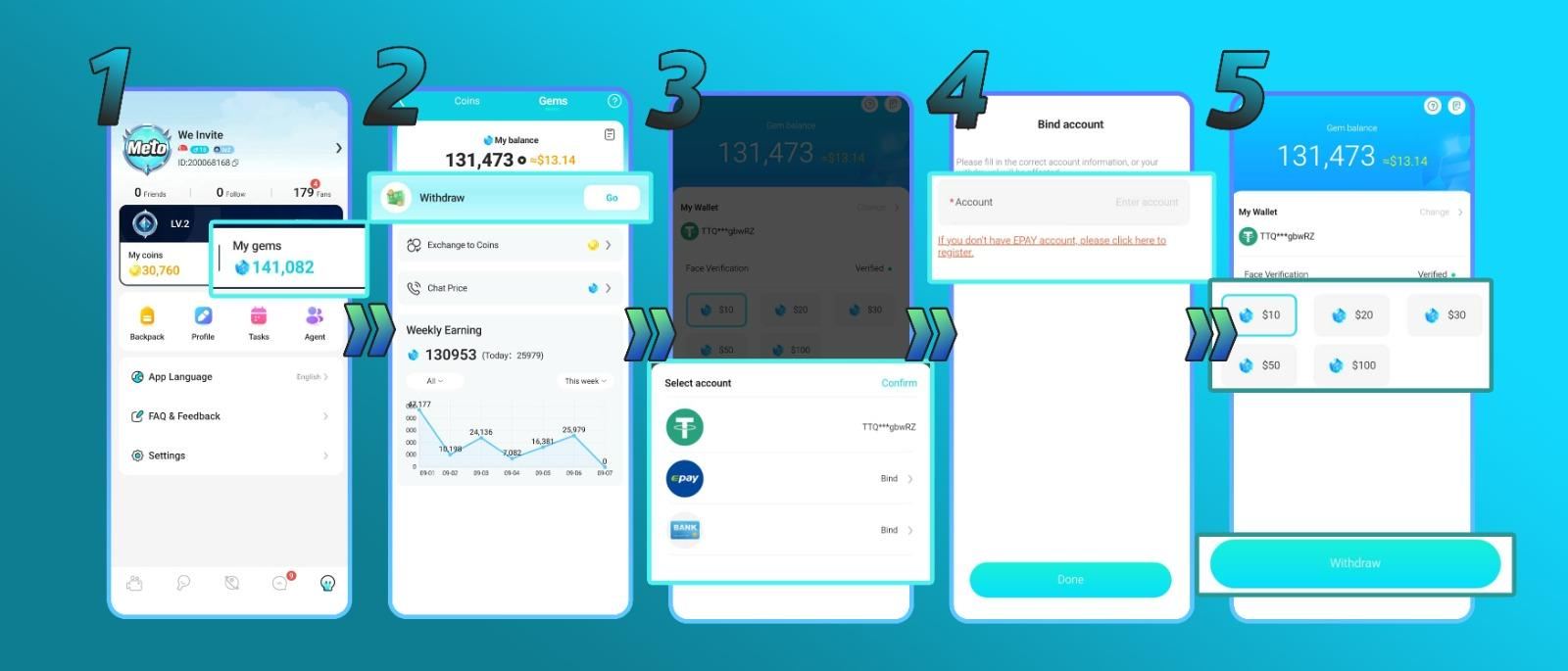
Agents are responsible for managing their Hosts and Sub-Agents, staying active, and following Meto Live platform rules.
Yes. You need to download the Meto Live app, create an account, and copy your Meto ID before registering as an Agent.
Use the official Agency Registration link: agent.livetalkworld.com
You can see invite links for Hosts and Sub-Agents, gain details, ratios, and the number of Sub-Agents, Hosts, members, or users you invited.
Yes. Agents can open the Meto Live app, go to profile, click Agent, click Invite Sub Agent, then copy and share the invitation link.
Agents can earn commission from agency revenue, including activity from Hosts, Sub-Agents, and invited users.
Agents can withdraw through the Meto Live app by opening My Gems, connecting a payout method through My Wallet, selecting the amount, and submitting the withdrawal request.
Download the Meto Live app, create your account, register as an Agent, and start growing your Host and Sub-Agent network.