

All the effort you dedicate to being a Meto Live host or agent deserves a smooth, hassle-free withdraw. In this comprehensive guide, we will walk you through the entire Meto Live withdrawal process from start to finish. Keep reading to discover exactly how to cash out your hard-earned money, resolve the most common payout issues, and find clear answers to frequently asked questions so your transfer goes off without a hitch.
Meto Live Withdrawal Requirements You Must Meet
Before initiating your cash-out, make sure your account meets these four mandatory criteria:
- Completed Face Verification: This is a strict requirement for everyone. Hosts must verify their identity before going live, and agents must complete it before processing any payouts. If you haven’t tackled this yet, refer to our full face verification guide to get approved quickly.
- Verified Email or Phone Number: Your account must be securely linked to valid contact information. Navigate to your Meto Live profile and confirm that your phone number or email address is successfully bound to the app.
- Minimum Withdrawal Amount: You cannot request a payout until your available balance hits the minimum withdrawal threshold of $10 USD.
- Active Payment Account: Meto Live processes payouts through direct bank transfers or supported e-wallets. Ensure your preferred receiving account is fully active and in good standing. We will detail the full list of supported payment platforms below.
Meto Live Withdraw Tutorial (Step-by-Step)
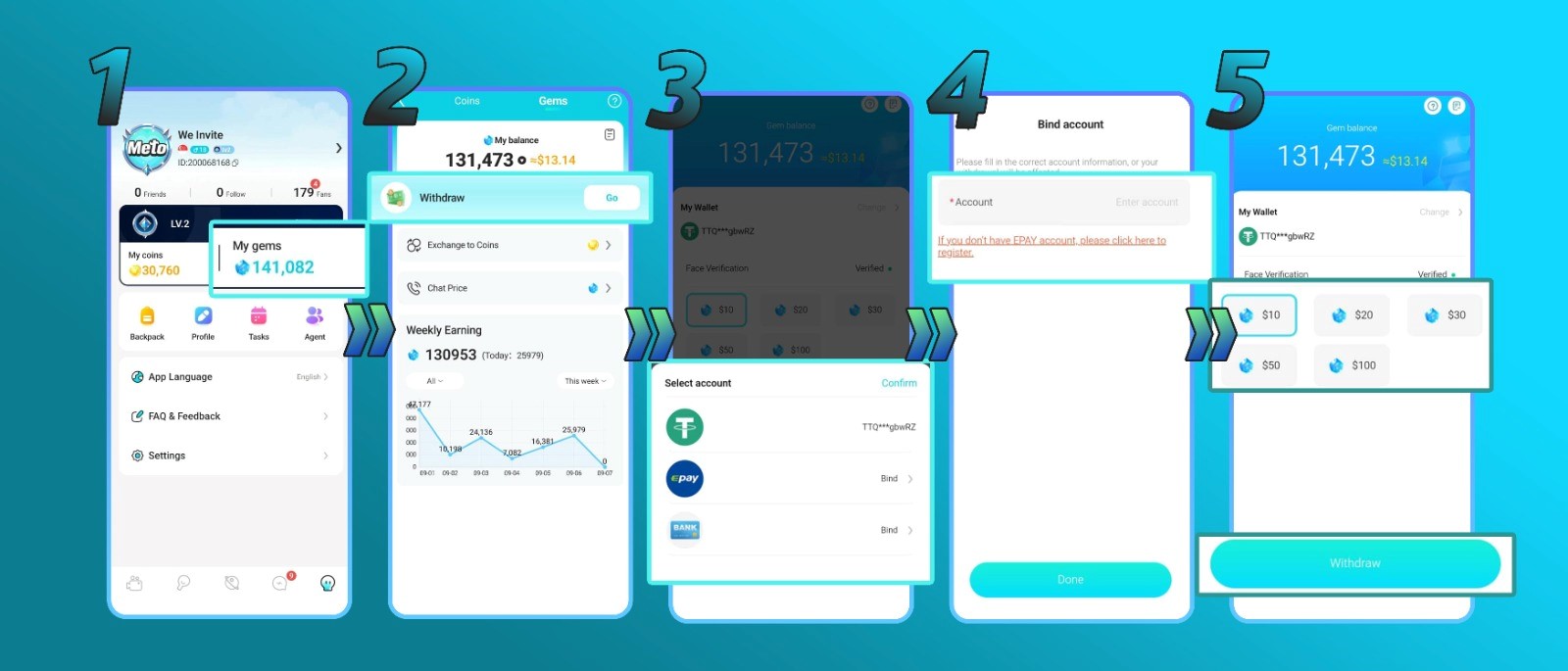
1. Visit Your Profile and Click ‘My Gems’
Tap your profile icon to open your main account menu. From there, locate and click on the My Gems tab to view your current earnings and wallet balance.
2. Click the ‘Go’ Button Underneath Your Balance
On the balance screen, look right below your total available funds and tap the Go button to initiate the cash-out phase.
3. Select Your Payout Method Using the ‘My Wallet’ Button
Tap My Wallet to link your preferred destination account. Meto Live offers flexible payout options, including direct bank transfers, local e-wallets, Payoneer, and USDT (Crypto). Note: Availability depends heavily on your country, so check the app menu for the specific options active in your region.
4. Bind Your Payout Account and Click ‘Done’
Carefully input your banking or e-wallet information. Double-check every digit to ensure complete accuracy, then hit the Submit button to bind the payment method to your profile.
5. Select the Amount and Click ‘Withdraw’
Choose exactly how much money you wish to cash out, ensuring you meet the minimum payout threshold (such as the base $10 USD requirement), and tap the Withdraw button.
Meto Live Withdrawal FAQ
- What is the minimum withdrawal amount?
The minimum cash-out threshold is $10 USD. Keep in mind that all withdrawals must be processed in specific multiples of 10 (for example: $10, $20, $50, $100, or $200).
- What payment methods does Meto Live support?
The platform currently supports Epay, USDT crypto transfers, PayPal, direct bank transfers, and local e-wallets. Because the available options vary based on your geographic location, check your app’s withdrawal portal for the exact list of services supported in your area.
- Are there any transfer fees?
This depends entirely on your selected payment method. Certain third-party payment providers charge their own internal transfer fees, and these rates fluctuate from one service to another. Always verify the fee structure with your chosen provider before cashing out.
- Can hosts withdraw their own earnings?
Absolutely. As an active host, you maintain total control over your wallet and can initiate a withdrawal independently whenever you are ready.
- What if I linked the wrong payment account?
There is no need to panic. Meto Live places no restrictions on unlinking a payout destination. You can easily remove the incorrect details and update your payment information at any time.
Troubleshooting Common Withdrawal Issues
- My withdrawal failed to process
Failed payouts usually stem from incorrectly typed payment details, a suspended or inactive receiving account, or using a bank/method currently on the platform’s restriction list. If your transfer fails, try switching to an alternative withdrawal method and contact our support team for specialized assistance.
- A specific payment method isn’t showing up
Payment gateways are heavily region-dependent. If a certain service isn’t listed, it is simply not supported in your current area. Please select from whichever payout methods are currently displayed as available for your location.
- My withdrawal is taking longer than expected
Under normal circumstances, standard withdrawals are fully processed within three business days. If your transaction has been sitting in a pending status for longer than that, reach out to our support team so we can investigate the hold-up for you.
Your Earnings Are Just a Few Taps Away
Once your requirements are fulfilled, the Meto Live withdraw process is incredibly straightforward. Whether you are cashing out as a host or an agent, the most important step is simply guaranteeing your payment details are 100% accurate and your preferred method is properly linked before hitting submit.
Still have questions about the cash-out process or anything else related to the platform? Our dedicated support team is always on hand and ready to assist you. Don’t hesitate to reach out directly, or visit our blog for more expert tips, app tutorials, and earning guides!