
Successfully completed your host registration? Your next essential move is tackling the Meto Live face verification. This fast, mandatory step is required for every new host before you can launch your first broadcast or cash out your earnings. Keep reading for a complete breakdown of exactly how the Meto face verification process works, along with quick fixes for the most common troubleshooting issues you might face.
How to Complete Meto Live Face Verification
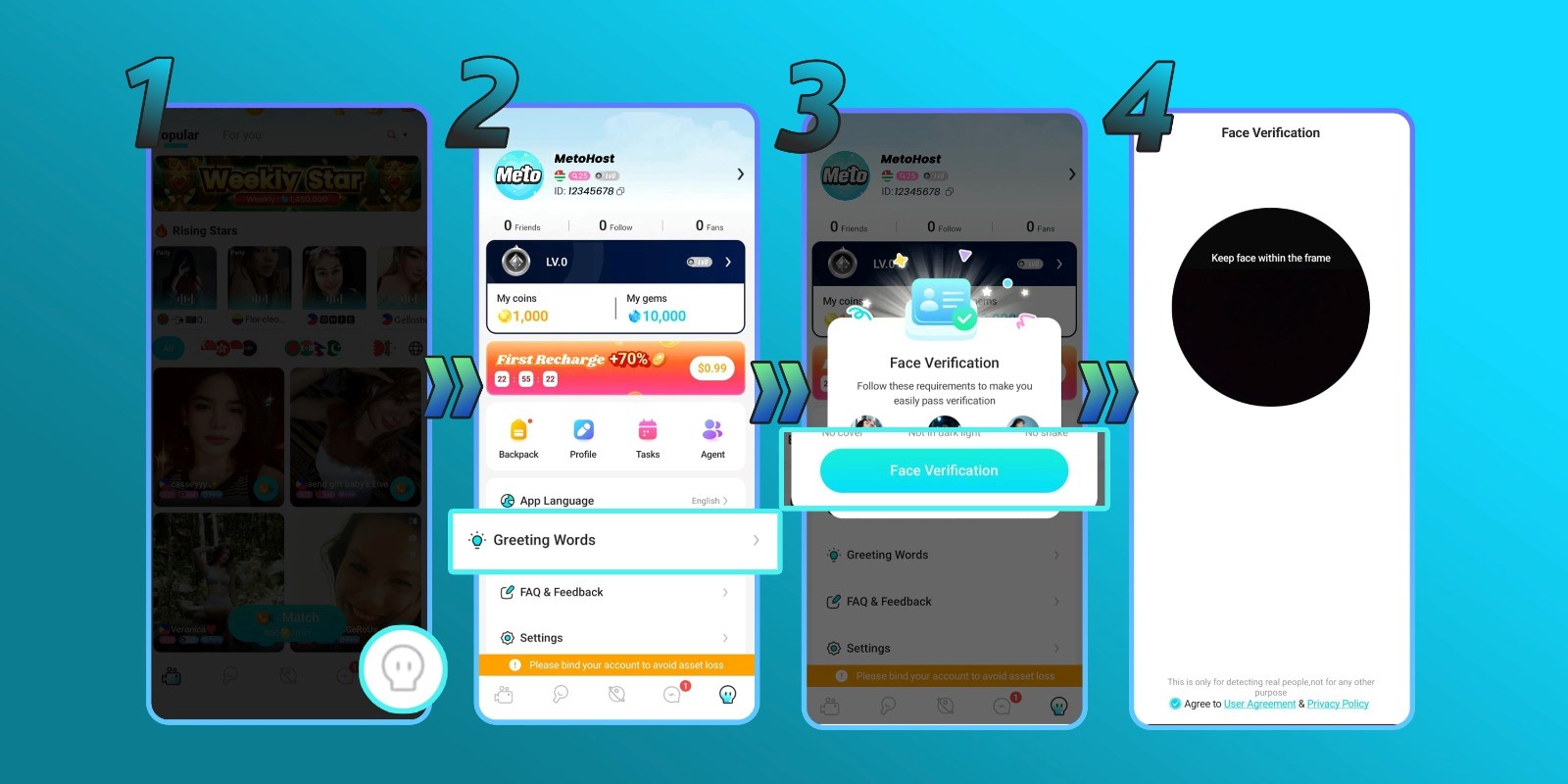
1. Open the Meto Live App With Your Host Account
Launch the Meto Live application on your smartphone and double-check that you are actively logged into your newly registered host profile. You must be on the correct account to tie your facial scan to your broadcasting dashboard.
2. Visit Your Profile and Select ‘Greeting Words’
Tap your profile icon to open your main account menu. From there, scroll through your settings and click on the Greeting Words option. This specific menu acts as the secure gateway to launch your facial recognition scan.
3. Follow the On-Screen Camera Instructions
Once your front-facing camera activates, carefully follow the live prompts provided by the app. You will need to center your face within the frame and may be asked to blink, nod, or move your head slightly.
Remember: This verification is strictly mandatory to unlock core host features, including your ability to go live and receive gifts!
4. Start Live Streaming!
As soon as your scan is approved, your broadcasting tools are officially unlocked! To maximize your viewership and earnings right out of the gate, keep these pro tips in mind:
- Invest in a proper camera and lighting setup so your stream looks high-quality and professional.
- Always use a highly stable Wi-Fi or mobile data connection to prevent lag.
- Commit to a consistent streaming schedule so you can easily hit your platform target requirements and build a loyal audience.
Meto Live Face Verification FAQ
- What happens if I don’t complete face verification?
Skipping this step means you will remain locked out of your core features. You will not be able to broadcast live or withdraw any of your earnings. It is an absolutely mandatory requirement for all active hosts on the platform.
- What if I make a mistake during the video verification steps?
Don’t worry! If you miss a prompt or the lighting is off, you can redo the live video verification steps as many times as necessary until the system successfully accepts your scan. There is zero penalty for having to retry.
- Why does the app occasionally ask me to verify my face again?
Periodic re-verification is simply a built-in feature of Meto Live’s advanced security system, designed to protect your account and your wallet from unauthorized access. Whenever you receive a prompt, just complete a quick scan to ensure your account remains safe and in good standing.
- My face verification keeps getting rejected, what should I do?
You are granted several verification attempts throughout the day. If you happen to hit your daily limit, simply wait 24 hours and try again in a room with better lighting. If the rejections persist over multiple days despite following the instructions, reach out to our support team and we will manually help you sort it out!
The Sooner You Verify, the Sooner You Earn
Completing your Meto Live face verification might feel like just another administrative task, but it is a critical step you should not put off. Because going live and accessing your hard-earned money is impossible without it, getting verified right away guarantees a frictionless start to your broadcasting career. The scan only takes a few seconds, and by following the simple steps outlined in this guide, you will breeze right through it.
Do you still have questions about the verification process or other features inside the Meto Live app? Our dedicated support team is always just a quick message away. Don’t hesitate to reach out to us directly, or browse our blog for more expert hosting tips and account tutorials!