
Live streaming is one of the two primary ways to earn money on Meto Live. As a broadcaster, the job is refreshingly simple: go live, connect with new people worldwide, and collect virtual gifts from your viewers. However, what makes this app truly stand out are the exclusive benefits. From lucrative daily bonuses and monthly events to leaderboard rewards and private call earnings, these perks are hard to find anywhere else. Ready to start broadcasting? Let’s dive right into the essential Meto Live host registration requirements you need to meet to get your account up and running.
How to Complete Your Meto Live Host Registration
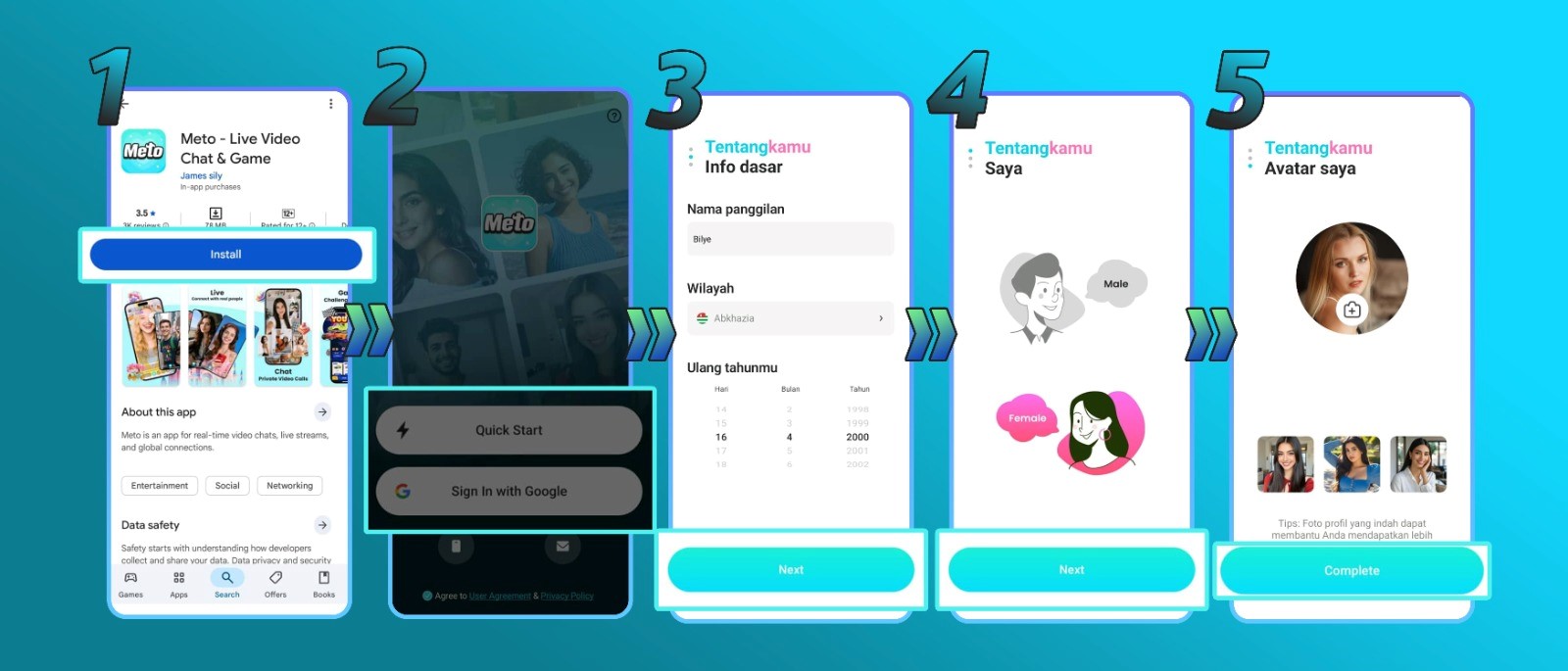
1. Download the Meto Live App
First, start by downloading Meto Live from the Google Play Store or Apple App Store. Specifically, for the fastest setup click our direct referral link right here to download the app and start your registration.
2. Register Your Account
Once the app is installed, open it and choose your preferred sign-up method (such as your phone number or email) to create your account.
3. Fill Out Your Basic Profile
The app will prompt you to enter your core details. In this case, carefully input your name, gender, date of birth, and any other requested information.
4. Upload a Verification Photo
You must upload a clear profile picture to proceed. Note: For this initial registration photo, the image must be completely original and unedited. Do not use any face filters, touch-ups, or artificial enhancements, or your application may be rejected!
5. Click ‘Complete’ to Finish
Once your details are accurate and your authentic photo is uploaded, tap the Complete button. Congratulations, your host registration is successfully submitted!
Troubleshooting Common Registration Problems
- Selected the wrong gender or country?
Unfortunately, these specific details are permanently locked once your account is created. In this case, you will need to abandon that profile and create a brand-new account with the correct information.
- Can’t access the registration link?
Ensure you are clicking the official referral link provided on this page. Our link is fully compatible with both iOS and Android. If the page won’t load, try temporarily disabling your ad blocker, switching your Wi-Fi/data connection, or refreshing the page.
- Having trouble uploading a photo?
If the system rejects your picture, it usually means the image looks altered. Instead, your first registration photo must be 100% natural and unedited. Once your account is officially approved and running, you are free to change your profile picture to an edited or filtered photo!
Meto Live Host FAQ
- Can I fix a typo in my username?
Don’t worry if you misspelled something. You can update your username at any time by navigating to your profile settings.
- Can I have multiple host accounts on one phone?
No. Meto Live strictly limits each physical device to a single registered host account.
- Is screen recording allowed during live streams?
No. To protect the privacy and safety of both broadcasters and viewers, Meto Live has disabled screen recording across the entire app.
Welcome to Meto Live! Your Hosting Journey Starts Here
In general, getting registered on Meto Live really is that smooth and simple. So, if you’ve followed the steps above, congratulations, you are officially a Meto Live host, and your earning potential is right at your fingertips!
Do you still have questions about getting started, navigating the app’s features, or maximizing your daily bonuses? Our support team is always happy to help. Reach out to us anytime, and be sure to browse our blog for more expert tutorials and tips designed to set you up for massive success on Meto Live!