
Not interested in going live on camera? You can still build a highly profitable income stream on the platform by becoming a Meto Live agent. Instead of broadcasting, agents work behind the scenes to recruit talented hosts and manage a successful streaming team. This is the ideal opportunity for anyone with strong leadership and talent-scouting skills. Ready to launch your own agency? Let’s dive into the essential Meto Live agency registration requirements to get your application moving.
How to Complete Your Meto Live Agent Registration
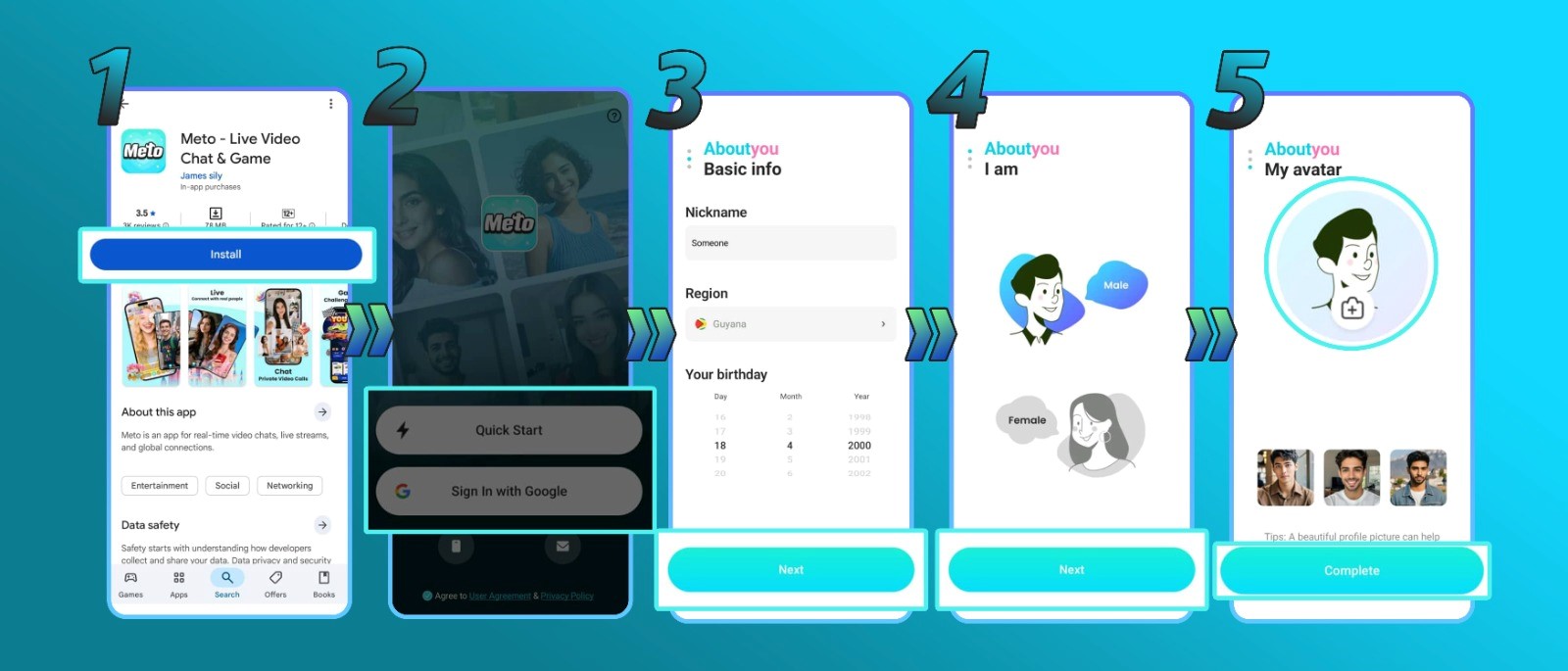
1. Download the Meto Live App
First things first, you’ll need the app on your device. Head over to your app store to download Meto Live, or for the quickest and easiest start, simply tap our direct referral link provided on this page to grab the download instantly.
2. Sign Up on the Meto Live App
Once installed, open the application and create your new user profile. Meto Live offers several convenient ways to register, you can easily sign up using your current email address, your mobile phone number, or by directly linking an existing Google or Facebook account.
3. Locate and Copy Your Account ID
After successfully logging into your new account, navigate straight to your personal profile page. Look for your unique Meto Live account ID displayed on the screen and copy those numbers to your device’s clipboard. You will need this exact ID to properly link your agency.
4. Open the Agency Registration Portal
With your ID copied, it’s time to officially apply as an agent. Click on the dedicated Meto Live agency registration link below to access the secure agent portal: https://agent.metolive.com/login?id=1295
5. Submit Your ID and Request Verification
On the registration portal page, paste the Meto ID you copied earlier into the designated text box, and then hit the ‘Get’ button. This action triggers the system to send a unique, secure verification code directly to your inbox inside the Meto Live app.
6. Enter the Code and Access Your Dashboard
Check your app messages, retrieve the verification code, and type it into the portal. Click ‘Submit’ to finalize the process! You will instantly be redirected to your brand-new Meto Live agent dashboard. This powerful control center is where you will manage your entire business, giving you full access to:
- Your custom referral links to invite new Hosts and Sub-Agents.
- Detailed breakdowns of your daily and monthly Earning details.
- Your current commission Ratio.
- Live statistics tracking the total number of sub-agents, hosts, and members/users you have successfully recruited.
Troubleshooting Your Meto Live Agency Registration
- Missing the SMS Verification Code?
This usually happens if your phone number was typed incorrectly. Double-check your digits and try again. If your information is correct but the code still isn’t arriving, try switching your internet connection (from Wi-Fi to mobile data, or vice versa), wait a few moments, and request a fresh code.
- Broken Registration Link?
Ensure you are clicking the official registration link provided exactly as it appears on this page. If the portal is blank or refusing to load, temporarily disable any active ad blockers on your web browser, or wait a few minutes and refresh the page.
Meto Live Agent FAQ
Have a few more questions before you start recruiting? Here is everything you need to know about managing your new agency:
- What are the main benefits of being a Meto Live agent?
As an agent, your earning potential is completely uncapped. You generate lucrative income through commissions across multiple streams, including your hosts’ total earnings, virtual gifts, and revenue generated by any sub-agents you manage.
- Can I operate multiple agencies?
No. Meto Live policy strictly restricts users to owning and operating only one agency per person.
- What if I typed the wrong username during sign-up?
You can easily update and change your username at any time by navigating to your profile settings after logging into the app.
- What if I selected the wrong country or gender?
Unfortunately, these specific details are permanently locked once your registration is submitted. If you made an error here, you will need to create a brand-new account with the correct information.
- Are hosts allowed to transfer into my agency?
Yes, but the transfer process isn’t instant. The host must formally submit an in-app request to leave their current agency and wait for official approval before they can officially join your roster.
- Am I allowed to live stream if I’m an agent?
Absolutely! Managing a team doesn’t restrict you to behind-the-scenes work. All Meto Live agents maintain full access to go live and stream whenever they want.
Completing Your Meto Live Agency Setup
Setting up your Meto Live agent profile really is that straightforward! With your registration complete and your dashboard unlocked, you can immediately dive into everything the app has to offer, from managing your new broadcasting team to unlocking entirely new revenue streams.
Need a little extra help getting off the ground? Reach out to our support team with any questions about your new agency features, or check out our blog for the latest recruitment guides, tips, and earning strategies.